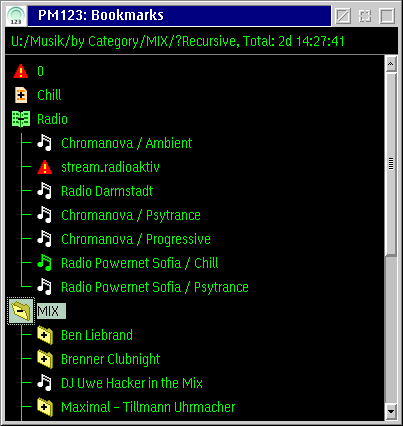
 Playlists
may now be nested, even recursive.
Playlists
may now be nested, even recursive.PM123 1.4x is a fork of PM123 1.32 providing many new features. See change
log for further details.
The source code is now hosted at GitHub including the history since 2006. See GlassMan Software/PM123 for the 1.3x releases.
PM123 1.42 should be rather stable. It is probably the last release from me. However, I will still fix bugs if I get detailed bug reports.
If you want to contribute to the further development have a look at the developer documentation to get used to the source code or contact me. See the task list for open issues.
PM123 1.42 beta (3.8 MB, also available at Hobbes)
PM123 1.42 beta Debug (6.7 MB, logging support)
PM123 1.42 beta Source (19.5 MB, also available at GitHub)Note that the debug build is slower, but it provides support for detailed error tracking and bug reports. Furthermore the logging can cause drop outs in the audio at heavy system load because of the reduced priority of the logging output during DART events.
Unzip the binary zip file to a new folder.
Be sure to have libc063 installed on your system. (This is default on eComStation.)
You may use configuration files from older PM123 1.3x releases. Most of your settings will survive - sometimes too much. But it is strongly recommended to force the default settings for all plug-in types in the properties dialog. There are restrictions when using older plug-ins.
Playlists
may now be nested, even recursive.See change log for further details.
Online help
Plug-in development kit documentation
Developer documentation
If you encounter problems with this release you may send a bug report to the contact address below. A bug report should contain:
- a short description of the problem,
- the release and the time stamp of PM123.exe and
- an exact description how to reproduce the problem with a newly started PM123.
If it is not straight forward to reproduce the problem please try enabling the logging to capture useful information. You get the log file by starting PM123 (binary with debug support only!) from the command line with:
C:\app\pm123>pm123 2>log.txt
Please keep the playing time as short as possible, when creating a log for a bug report, because the log file grows rapidly. If you manage to reproduce the problem with a hopefully small log please compress it and attach it to the bug report. Mails with some megs of attachments may not reach their recipient.
1.41 (3.6 MB)
1.41 Debug (6.2 MB, logging support)
1.41 Source (18 MB)1.41 beta3 (3.6 MB)
1.41 beta3 Debug (6.2 MB, logging support)
1.41 beta3 Source (18 MB)1.41 beta2 (3.5 MB)
1.41 beta2 Debug (6 MB, logging support)
1.41 beta2 Source (18 MB)1.41 beta1 (3.5 MB)
1.41 beta1 Debug (6 MB, logging support)
1.41 beta1 Source (18 MB)1.41 alpha2 (3 MB)
1.41 alpha2 Debug (5.5 MB, logging support)
1.41 alpha2 Source (18 MB)1.41 alpha1 (3 MB)
1.41 alpha1 Debug (5 MB, logging support)
1.41 alpha1 Source (18 MB)1.40 alpha4 Binary (1.9 MB, also available at Hobbes)
1.40 alpha4 Debug Binary (2 MB, logging support)
1.40 alpha4 Source (8MB)1.40 alpha3 Binary
1.40 alpha3 Debug Binary (logging support)
1.40 alpha3 Source1.40 alpha2 Binary (also available at Hobbes)
1.40 alpha2 Source1.40 alpha1 Binary
1.40 alpha1 Source
| Task | Description | State |
|---|---|---|
| Filter plug-in interface: improved potentials | The old filter plug-in interface offers very few options. Each block has to be processed synchronously. This may cause
unwanted latency as well as bad performance. A new version offers a full proxy interface to the output plug-in or the next filter plug-in respectively. This gives you the chance to reduce the latency of large filters, change the sampling rate and so on. |
stable |
| Gapless playback in playlist mode | When playing files in a playlist PM123 now starts fetching and decoding the next file before the last sample of
the current file is played. (I am not talking about a cross fader plug-in or any crap like that.) This enables absolutely gap-less playlists of continuous albums. Of course, the files have to be cut correctly. This is a bit tricky for MPEG audio files that normally do not this out of the box. |
stable |
| Merge playlist manager and playlist into one hierarchical structure with 2 views | A playlist now may contain other playlists. This offers plenty much of new features including sub menus in the bookmarks and so on. | stable |
| All decoder plug-ins: Add custom entries to the context menu "Load...". |
The decoder plug-in interface provides now a function to extend the Load.../Add... context menu. There were some hard-coded stuff in the PM123 core which is related to the CDDAplay decoder plug-in. This is now in CDDAplay using the new interface. |
stable |
| Plug-in interface for playlist-like objects | Beyond the decoder plug-in it would be helpful to have plug-ins that decode enumerable objects like cue sheets and so on. | stable |
| PM123 core: Dealing with object slices | To play CUE sheets and similar sources it is necessary to play only slices of a song file. PM123 allows to put a start and a stop position to playlist references. | beta |
| Split decoder plug-ins into connection and decoder plug-ins. | This enables different codecs to be used for streaming sources. Superseded by the new decoder interface that can share XIO handles. |
canceled |
| Better performance with many decoder plug-ins | Currently each decoder opens the target to check whether it can play it. This could cause heavy load if
there is no file system cache, like with http streams. The decoder plug-ins should be able to share a single I/O stream when detecting compatibility. Furthermore extended attributes and file extensions can improve the selectivity for file system objects and MIME types for internet objects. |
stable |
| Flexible extension of GUI by plug-ins | Currently each plug-in has it's own configuration dialog. From the users point of view it is not obvious
where to seek for a setting. A flexible GUI interface should enable plug-ins to subclass the PM123 GUI and extend configuration dialogs as well as menus or drag and drop. |
not started |
| Task | Description | State |
|---|---|---|
| RealEQ 1.21 FFT-Convolution, improved filter kernel design |
The FFT convolution is many times faster than any hand-optimized MMX code. So using FFT convolution is the
prerequisite to use larger, more accurate filter kernels. The original kernel design function created FIR kernels with very bad locality and unreasonable sharp transitions at high frequencies. Furthermore low frequencies are processed very poorly even at the maximum FIR order. The new implementation cures most of the problems and allows 3 times larger filter kernels (due to the FFT convolution). |
discontinued, stable, included in PM123 1.32 |
| RealEQ 1.22 using new plug-in interface of PM123 1.40 |
The equalizer plug-in causes a filter delay in the order of 200ms. The new plug-in-interface allows to hide this delay resulting virtually in a zero phase filter. The new plug-in responds very fast to any user actions like seek and jump. Furthermore, enabling and disabling the EQ and changing the FIR order does not longer cause jumps in the playback. The filter response has also been improved. | stable |
| Analyzer Added spectroscope |
Added a very pretty spectroscope function to the built-in analyzer plug-in. Furthermore a optional high precision mode is now available to get more reasonable results. | stable |
| OS2rec 1.0 decoder plug-in to record from line-in |
This sounds crazy, but it can be useful under certain circumstances, e.g. to use the filter plug-ins in on the fly mode or to feed the analyzer with external data. | stable |
| PM123 core: MPG123 MP3 tag stuff moved to MPG123 since PM123 1.40 |
There was many MPEG audio related stuff in the PM123 core which should be moved to the MPG123 plug-in. | stable |
| New filter plug-in: digital room correction |
A plug-in that accepts a custom FIR filter kernel to do a digital room
correction. Since this requires quite large filter kernels, there is a strict dependency to the improved filter
plug-in interface above. Otherwise a latency in the order of one second is introduced and the same amount is cut at the
end of each file. Future versions may include the software to calibrate your room by utilizing the OS2rec plug-in. |
in progress |
| LogVolum 1.0 filter plug-in to give the volume bar of PM123 a logarithmic characteristic requires PM123 1.40 |
Many sound cards and/or drivers have linear volume controls for the mixer channels. Only the master volume is
logarithmic on the better ones. This is not very helpful with respect to our acouesthesia. This very small plug-in provides a good work-around for this issue. |
discontinued, moved to os2audio |
| New Ogg Vorbis plug-in | The new plug-in is superior to the old one in any way. Thanks to Dmitry A.Steklenev who did the work for PM123 1.32. |
stable |
| New parametric equalizer plug-in | With PM123 1.40a3 the simple equalizer has been removed. An always working replacement simpler than RealEQ would be nice. | not started |
| Compressor plug-in | Some sources like radio streams do not support ReplayGain values. They are often extremely loud. This
plug-in compensate for that. Replaced by bookmark and playlist specific loudness setting. |
canceled |
| PulseAudio plug-in | Plug-in to support PulseAudio output and recording. | stable |
| Flac plug-in with support for embedded CUE sheets | Using the new playlist plug-in interface of PM123 1.41 and object slicing embedded CUE sheets are no
longer a no-go. The most popular one, flac should be supported. Embedded CUE sheets do not work. I never managed to create such a file. |
beta |
| AAC decoder plug-in | A port of libfaad2 and an appropriate decoder plug-in to play AAC radio streams, and of course M4A files too. | beta |
Download the PM123 1.4x files to get the plug-in. RealEQ 1.22 is included.
This file is included since PM123 version 1.40 and should already be in-place.
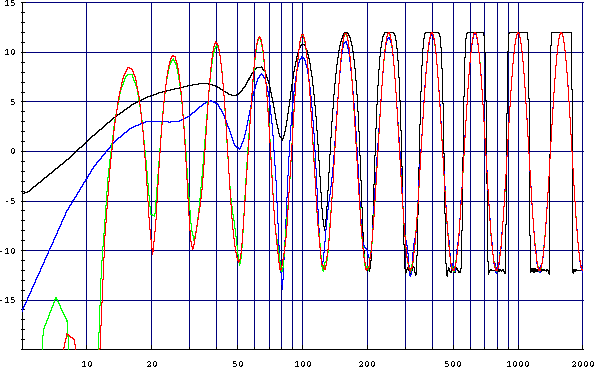 Comparison of the different RealEQ versions.
Frequency response of the equalizer at 44,1kHz sampling rate when all sliders are set alternating to +12dB and -12dB.
X-axis: frequency [Hz]
Y-axis: amplitude [dB]
Black line: RealEQ version 1.20, max FIR order of 4096
Green line: RealEQ version 1.21, FIR order 12288
Red line: RealEQ version 1.22, FIR order 16384
Blue line: RealEQ version 1.22, FIR order 4096
Even at the same filter order of 4096 the new equalizer performs better by nearly a factor of two.
Download the PM123 1.40 files to get the plug-in. LogVolum is included.
This file is included in PM123 version 1.40 and should already be in-place.
This small plug-in turns the characteristic of the volume control in PM123 from linear to logarithmic.
You may use this plug-in to compensate for the linear characteristic of the volume controls of the many common sound devices.
Do not use this plug-in if your sound card already has a mixer with a logarithmic characteristic.
Response of the PM123 volume control.
X-axis: relative position of the volume slider [%]
Y-axis: gain [dB]The red line is the response function with the correction.
Instead of an exponential function the plug-in uses the polynomial:
The green line is the response function of usual sound devices without this plug-in.
with x and y in the range [0,1] for the transformation. This gives an approximately exponential function with a usable dynamic range of almost 30dB while keeping the zero point at -?dB.
y = x 1 + sqrt(10) · (1 - x)
Recording plug-in for PM123.
Download the PM123 1.4x files to get the plug-in. OS2rec is included.
This file is included since PM123 version 1.40 and should already be there.
Note: Although OS2rec does not strictly depend on a recent PM123 version bugs in older PM123 builds makes it nearly impossible to use the plug-in. PM123 before 1.32 simply does not accept URL inputs which do not start with http://. The only way to get it working is to edit a playlist file and insert an URL with record:///...
To start the recording right click PM123, choose Load..., Record... and follow the dialog. Alternatively choose Load..., URL... and enter an URL of the following style:
record:///[sounddevice][?param1=value1[¶m2=value2[&...]]]
sounddevice is either a device ID (integer number) or a name of a mixer device usually AMPMIXxx. The Device ID 0 is the default MMOS2 sound device.
The parameters below may be used to control the recording parameters.
Parameter Value Default Remarks samp[lerate] Sampling rate in kHz 44100
ch[annels] Number of channels (usually 1 or 2) 2
mono - none -
Alias for channels=1 stereo - none -
Alias for channels=2 bit[s] Number of bits per sample and channel 16
share[d] y[es]|n[o], default: yes yes Using the non-shared mode will also block other mixers from working. in[put] l[ine]|m[ic]|d[igital] line
Examples:
record:/// Start recording from the default sound device with default parameters: 44,1kHz, stereo, use line in record:///ampmix01 Start recording from the specified sound device record:///0?samplerate=48000&mono Start recording from the default sound device with 48kHz sample rate and only 1 channel record:///0?input=mic Start recording from the default microphone input.
Binary (REALEQ.DLL, should work with all versions of PM123)
Source (requires PM123 1.32 source tree to be build, see http://www.5nets.ru/pm123.html)
Replace REALEQ.DLL in your PM123 directory by the one above. PM123 must not run meanwhile.
The new plug-in give you an additional choice how to do the convolution: FFT convolution. I strongly recommend to use the new FFT convolution, since it is far superior. Furthermore it does not depend on CPU features like MMX. It scales with O(log n) with the FIR kernel length whereas the other methods scale O(n).
Now the maximum FIR kernel length is 12288. I recommend to use this maximum together with the maximum FFT plan size of 16384 unless your CPU sets you a more restrictive limit. Otherwise the first three sliders at 16, 20 and 25Hz will not perform very well. But do not try to use these values without FFT convolution.
You may reduce the FIR kernel length if (and only if) the low frequency sliders are set to the same value or at least very close together. For each consecutive slider which has the same value than the 16Hz one you may shorten the FIR kernel length by about 26%.The FFT plan size in the settings dialog has now no more meaning unless you choose FFT convolution. The plan size for the FIR kernel design is now chosen automatically.
The new FIR kernel design derivate in three main aspects from the old one:
- The desired frequency response function is now interpolated between the supporting points with a sine² function. This avoids unreasonable sharp jumps in the frequency response and makes the filter kernel shorter.
- The filter designer does no longer create 32 base functions in the time domain which are mixed when an equalizer slider changes. Instead, the FIR kernel is always created from scratch. This reduces the memory footprint by 1,6MB. Instead of that a DCT transformation is required now on each parameter change. However, this is required anyway to support the FFT convolution.
- The windowing function is much more aggressive now. The results in a worse stop band attenuation. However, since the equalizer does not provide more than 24dB dynamics anyway this is reasonable. Additionally the sine² interpolation above acts like a window function too.
Frequency response of the equalizer with an FIR length of 12288 at 44,1kHz sampling rate when all sliders are set alternating to +12dB and -12dB.
X-axis: frequency [Hz]
Y-axis: amplitude [dB]The black line is the intended frequency response.
The red line is the achieved frequency response.
The green dots are the (first) supporting points used for the filter design.
Comparison of the new implementation.
Frequency response of the equalizer at 44,1kHz sampling rate when all sliders are set alternating to +12dB and -12dB.X-axis: frequency [Hz]
Y-axis: amplitude [dB]Black line: real frequency response of the old implementation with the maximum FIR order of 4096. Nothing reasonable happens below 100Hz!
Red line: real frequency response of the new implementation with the maximum FIR order of 12288.
Green line: extrapolated frequency response of the old implementation with an FIR order of 12288. This is only to compare the filter design, since the old convolution core was too slow for this filter order.
 Spectrum
Analyzer
Spectrum
Analyzer Discontinued. Newer version included since PM123 1.40.
Binary (ANALYZER.DLL, requires PM123 1.32beta or above)
Source (requires PM123 1.40 source tree to build. PM123 1.32 or above works with minor source changes, see http://pm123.ptv.ru/)
Replace ANALYZER.DLL in the sub folder visplug of your PM123 directory by the one above. PM123 must not run meanwhile.
The new plug-in version adds two more visualization types:
- a linear spectroscope, scrolling from bottom up and
- a logarithmic spectroscope, scrolling right to left.
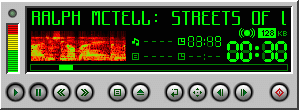
The spectroscope shows the amplitude as the color, the frequency as screen location and the time as screen location in the other direction. The dynamic range of the spectroscope is 40dB. Due to the usual nature of the frequency distribution in common music an additional weight function which scales with the square root of the frequency is multiplied to the amplitude before visualization.
This version of the analyzer also offers a new option called "high precision mode". This will take twice as much samples for analysis. Of course, the CPU load will increase. However, I recommend this at least for the logarithmic spectroscope to get more reasonable results.
Suggestions, help, complaints (but not too much:-): 
Original homepage: http://www.maazl.de/project/pm123/index.html